
Appearance
Forms the patient completes
The three screens a patient uses before or between visits. Everything here writes to the chart immediately.
Intake Forms
Medications, allergies and health history, entered by the patient.
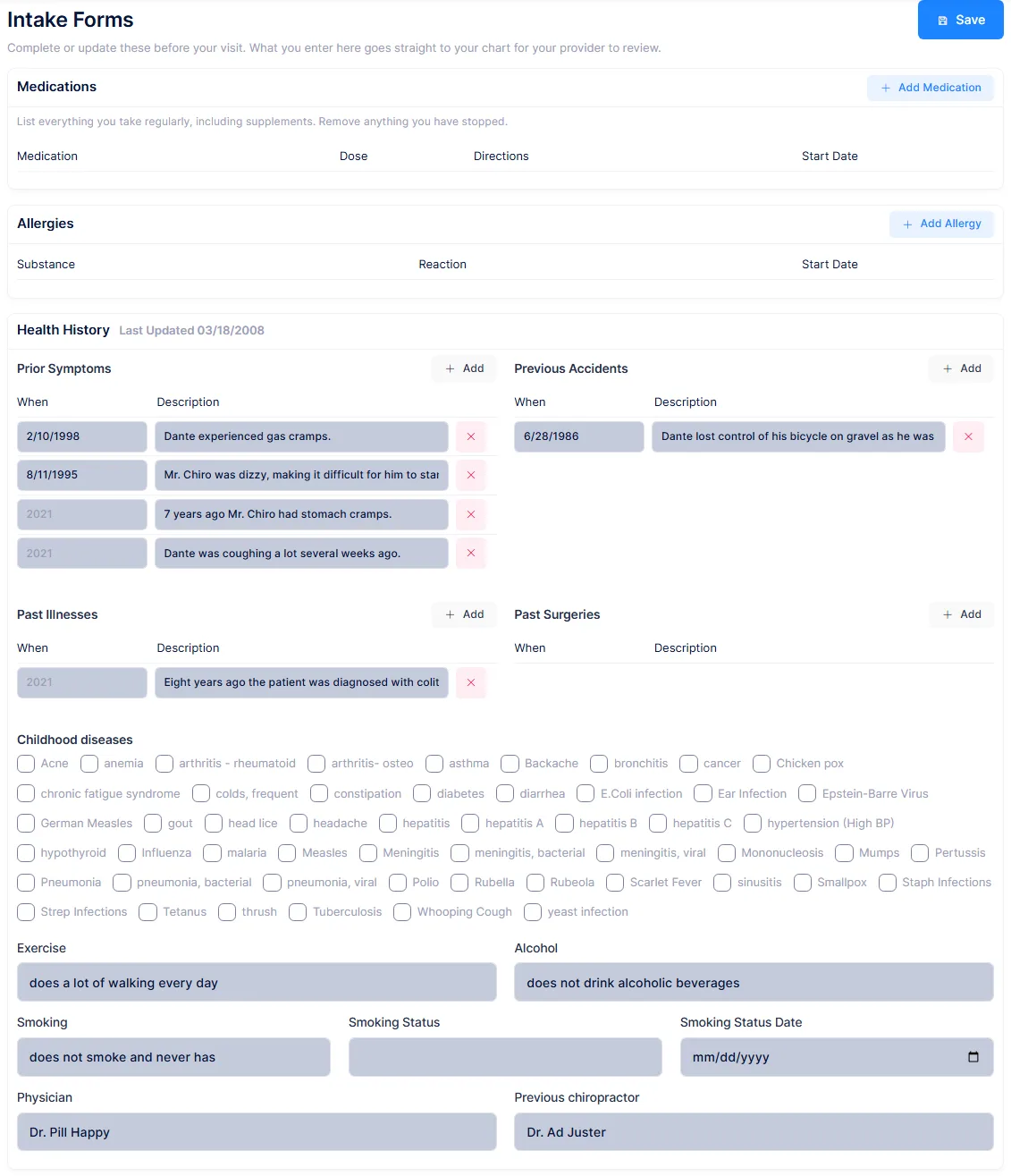
Medications and Allergies are add-a-row tables. Health History covers prior symptoms, previous accidents, past illnesses and past surgeries, a checklist of childhood diseases, and free-text answers on exercise, alcohol, smoking, their physician and any previous chiropractor. The lists offered are your own catalog values, but they are suggestions rather than a fixed choice, so patients can type anything.
Medications and allergies land on the same records the kiosk and History → Medication use, so they appear there straight away. The health history is filed as a new entry on History → Health, marked as portal-entered.
A patient can remove a medication a clinician entered
Any row in those grids can be deleted by the patient, including ones your providers added. The row is marked removed rather than destroyed, so it is recoverable, but nothing flags the chart and nobody is told. Review the medication list before relying on it clinically.
Every save files another history entry
Health history is never updated in place. A patient who saves five times leaves five entries on History → Health, all dated today, and the screen only ever reads the newest. Even a completely blank questionnaire creates one.
Two smaller things. Commas, tildes and angle brackets are replaced with semicolons, hyphens and parentheses when stored, because those characters separate fields in the underlying record, so "3/4, left side" comes back as "3/4; left side". And a row the patient edits that is no longer active on the chart is skipped silently, so an edit can vanish without an error.
Consent Forms
The practice's consent documents, read and signed on screen.
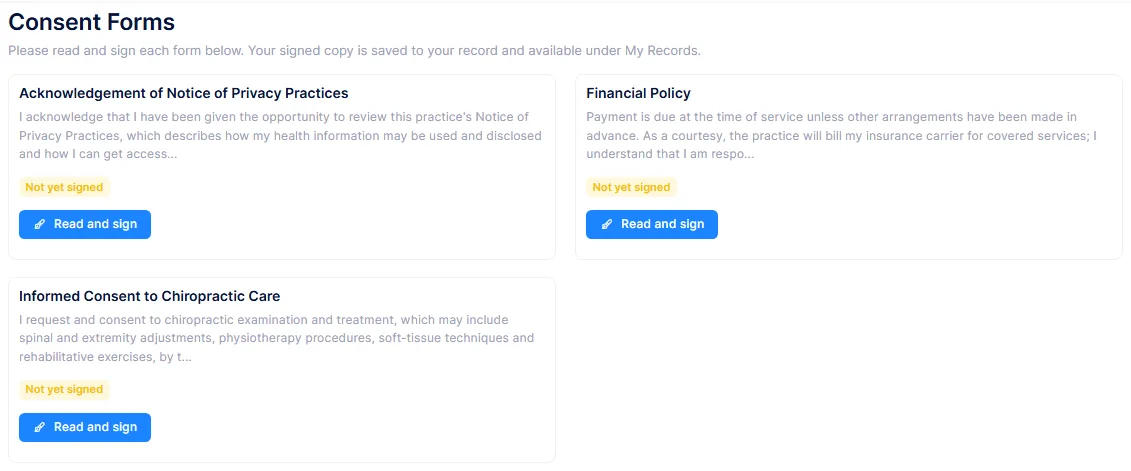
Each active template is a card with a status badge: signed with a date, not yet signed, or needing re-signing. Read and Sign opens the full text with a box for the patient's full name, a signature they draw with a mouse or finger, and a tick to confirm they have read it.
Templates are maintained on Front Desk → Consent Forms. A practice with none gets three created automatically on first use, covering HIPAA, financial policy and consent to treatment.
On signing, ChiroPad stores the consent with the exact wording as it stood, renders a PDF with the signature, and files it twice: in the chart's Scanned Documents in a PortalConsents folder, and on the patient's My Records list.
Editing a template asks every patient to sign again
Whether a consent needs re-signing is decided by comparing the signed wording against the current template. Correcting a typo therefore flips every patient who has ever signed it to "Consent Updated Please Re-Sign". Putting the wording back makes them count as current again.
Make template edits deliberately, and expect a wave of re-signing after each one.
Signature checking is a size test rather than a real one, so a single dot on the canvas is accepted. A patient cannot re-read a consent they have signed in the portal; they can only download the PDF, and that button needs the My Records permission.
There is no list of who has signed what
Staff can see a count of signatures against each template, and the PDFs in Scanned Documents, but there is no screen listing the signed consents on a chart. For an audit you would be opening documents one at a time.
Documents
A place for the patient to send you a file, most often a photo of an insurance card.
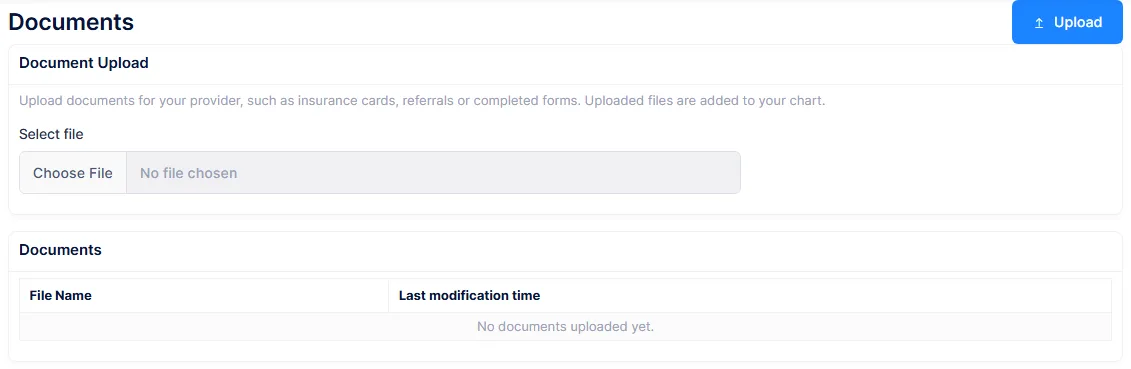
One file picker, and a list of what has been uploaded showing the name and date. That is the whole screen. Uploads arrive in the chart's Scanned Documents in a PortalUploads folder.
Nothing tells you a file has arrived
There is no notification, no queue and no record in the database, only the file itself. If you ask patients to upload their insurance card, someone has to remember to look in PortalUploads before the visit.
Three limitations worth knowing before you point patients at this screen:
- Any file type is accepted, with no allow-list and no friendly size limit. A large file fails with a raw error rather than a helpful message.
- A second upload with the same name overwrites the first, silently and with no version history. Two photos both called
scan.jpgleave you with one. - The patient can upload but cannot open, download, rename or delete anything afterwards. The list is text only, so a patient who uploads the wrong file cannot take it back and will have to ask.