
Appearance
Appointment reports
Five reports about the diary: who did not turn up, how the appointments resolved, who has nothing booked, and who is expected.
All five take the standard date range filter; all but the Appointment Schedule also take a provider filter. See how every report works for the common controls.
MIA Patient
The printable version of the Front Desk's MIA list — see Missed appointments.
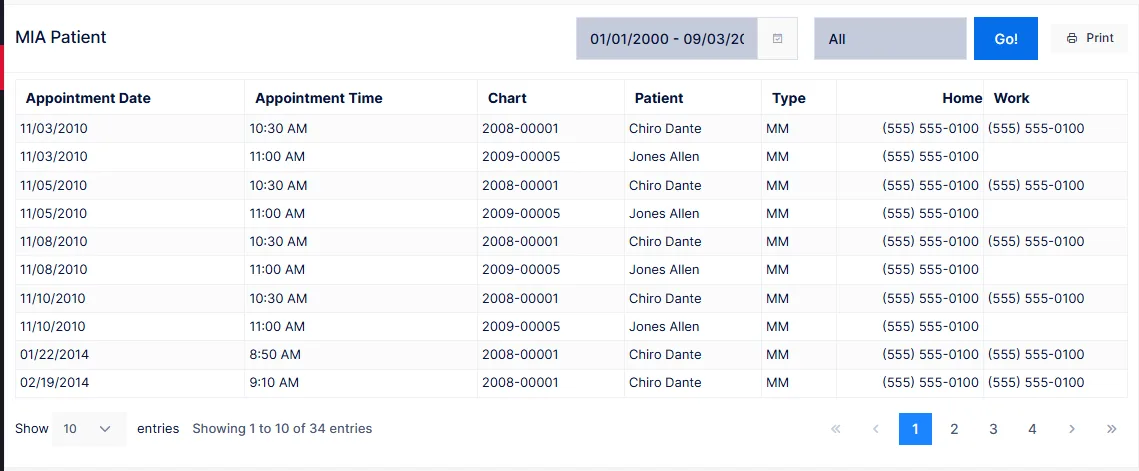
Lists every appointment in the date range that was missed and has not yet been resolved: the patient was booked, did not arrive, and nobody has recorded what happened. Once staff resolve the appointment on the Front Desk it drops off this report.
| Column | Shows |
|---|---|
| Appointment Date / Time | When the patient was expected |
| Chart, Patient, Type | Who, and their account type |
| Home, Work | Phone numbers, for the follow-up call |
This is the one report with a Go button: choose the range and provider, then click Go to run it.
Work the list from the Front Desk if you can
The Front Desk's MIA tab does everything this report does and also lets you resolve each appointment as you reach the patient. Use the report when someone needs a printed call list.
Appointment Statistics
A breakdown of every appointment in the range by how it ended, with a count and a percentage of the total for each:
| Status | Meaning |
|---|---|
| Completed | The patient came and was checked out |
| Signed-In | Signed in but not yet checked out |
| Walk-Ins | Seen without a prior appointment |
| Missed – No Action | Missed and still unresolved (the MIA list) |
| Missed | Resolved as a genuine no-show |
| Rescheduled | Resolved by booking another time |
| Staff Scheduling Error | Resolved as a booking mistake |
| Potential Appointments Closed | Online-booking requests that were closed |
The percentage is of all appointments in the range for the chosen provider, so it is a quick read on the practice's no-show rate.
Missed Appointment
The resolved side of the story: appointments in the range that were resolved as Missed, Rescheduled or Staff Error, together with the action staff recorded when they resolved them.
| Column | Shows |
|---|---|
| ProviderName, Name | Provider and patient |
| Appointment | The original appointment date and time |
| Type, Home, Work | Account type and phone numbers |
| Plan | What the appointment was for |
| Status | Missed, Rescheduled or Error |
| Action Taken | The staff action chosen at resolution, with its follow-up alert |
Together with MIA Patient this accounts for every missed appointment: MIA Patient shows the ones still to deal with, Missed Appointment shows the ones already dealt with.
Without Appointment
Active patients whose last visit falls in the date range and who have no future appointment booked. In other words: patients you saw recently who have nothing scheduled — the recall list.
| Column | Shows |
|---|---|
| Patient, Type | Who, and their account type |
| Home Phone, Work Phone, Cell Phone | How to reach them |
| Last Visit Date | When they were last seen |
Read the date range as "last seen between"
The range filters on the patient's last visit, not on appointments. Set it to the period after which you would expect a patient to have rebooked — the last four to eight weeks, say — and the report becomes the list of people to call.
Patients whose record is not Active are excluded, so discharged patients do not appear.
Appointment Schedule
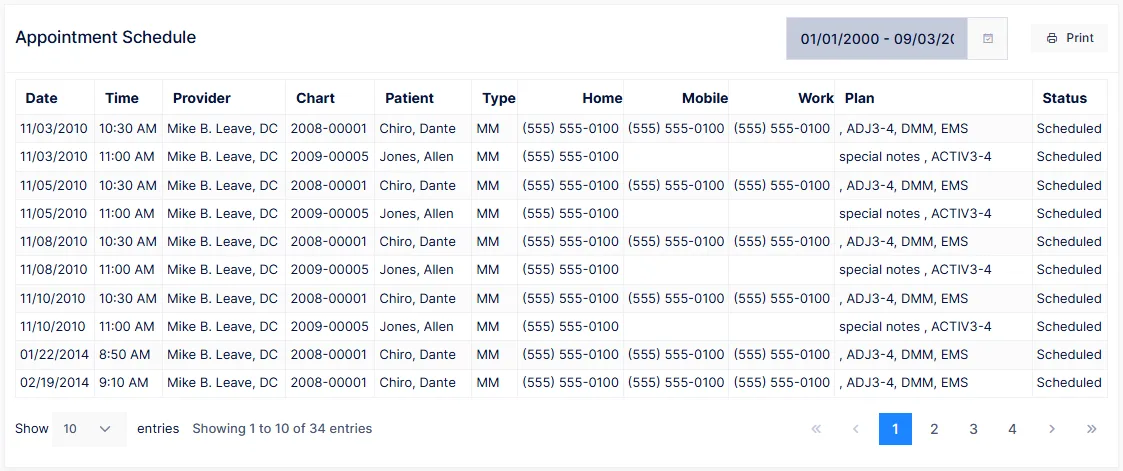
Every appointment in the date range, in time order — what the front desk prints at the start of the day, and what staff use for reminder calls.
| Column | Shows |
|---|---|
| Date, Time, Provider | When and with whom |
| Chart, Patient, Type | Who |
| Home, Mobile, Work | Phone numbers |
| Plan | The appointment's remark and the procedures on its plan |
| Status | Open, signed in, completed, missed, and so on |
There is no provider filter on this one; it lists every provider, sorted by time, so one printout covers the whole office.