
Appearance
Catalog reports
A printable master list for each catalog — the catalog table as it stands, one row per record. Useful for a periodic review of what is on file, and for handing a printed fee schedule or carrier list to someone who does not use ChiroPad.
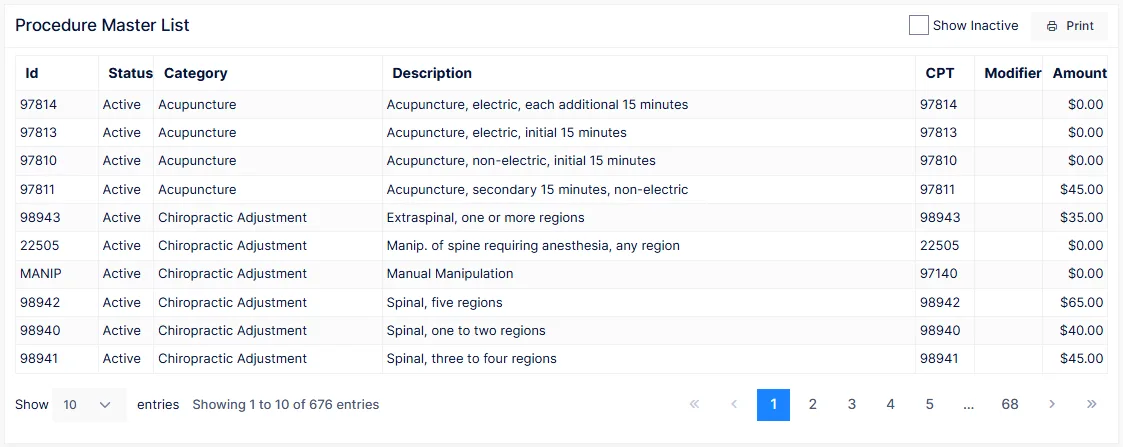
Each list has one control: Show Inactive. By default only active records are listed; tick the box to include everything.
| Report | Columns |
|---|---|
| Attorney Master List | Id, Name, Contact, Address, City, State, Zip, Phone, Fax, Status, Remarks |
| Carrier Master List | Id, Company, Contact, Phone, Address, City, State, Zip, Remark — the same report as Carrier Master |
| Diagnosis Master List | ID, ICD, ICD10, Brief description, Status |
| Diagnostic Imaging Master List | ID, Name, Contact, Address, City, State, Zip, Phone, Fax, Status, Notes |
| Employer Master List | Id, Employer, Contact, Address, City, State, Zip, Phone, Fax, Status, Remarks |
| Procedure Master List | Id, Status, Category, Description, CPT, Modifier, Amount — grouped by category |
| Provider Master List | ID, Name, Clinic, Address, City, State, Zip, Phone, Fax, Email, WebSite, Sub ID, Discipline, Status |
| Referring Physician Master List | Id, Name, Address, City, State, Zip, Phone, Fax, Email, WebSite, ID Number, Discipline, Status |
The lists are sorted by name (procedures by category, then description; diagnoses by ICD code), and like every report they can be searched, re-sorted, exported and printed — see how every report works.
The Procedure Master List is your fee schedule
Printed with Show Inactive off, it is the current list of everything the practice charges and what it charges for it. Keep a dated copy each time fees change.
The catalogs themselves are maintained under Catalog; nothing can be changed from these reports.