
Appearance
Appointment
The Appointment screen is the practice's diary. It shows who is booked, with which provider, and when — and it is where appointments are created, moved, resolved and deleted.
It works alongside the Front Desk, which is the live view of today. The scheduler is where you plan; the Front Desk is where you work the day.
Getting around
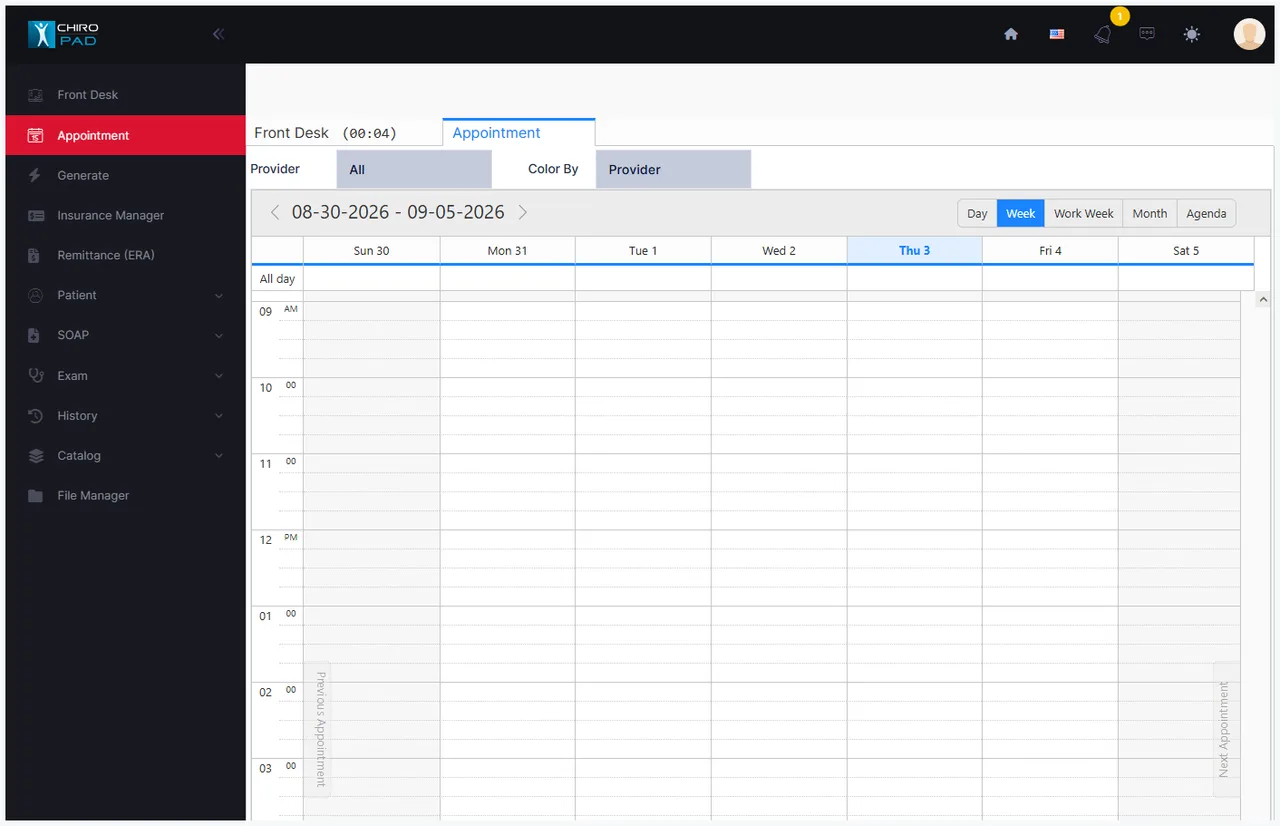
Views — switch with the buttons at the top right:
| View | Shows |
|---|---|
| Day | One day, in detail |
| Week | Seven days |
| Work Week | Working days only |
| Month | A whole month, at a glance |
| Agenda | A list rather than a grid |
Dates — the range is shown across the top with arrows either side to step back and forward.
Previous Appointment / Next Appointment — the narrow rails down the left and right edges jump to the nearest appointment outside the current view, so you can find the next booking without paging through empty weeks.
The day is a fixed grid
The calendar runs 6:00 AM to 10:00 PM every day, divided into 15-minute slots, for every provider. It is not built from a provider's working hours, so:
- you can book at any time on any day, including evenings and weekends
- nothing marks a provider as off duty — use Blackout Selected Range for that
- nothing stops two patients being booked into the same slot. There is no availability check and no overbooking permission; the second booking simply appears alongside the first
Blackout is how the diary learns your hours
Since the grid doesn't know when you are open, blacking out the times you are not is what makes the calendar readable. Block a provider's day off, the lunch hour and the closed evenings, and what remains is genuinely bookable time.
Filtering and colour
Provider filters the calendar to one provider, or All.
Color By decides what the colours mean:
| Setting | Colours by |
|---|---|
| No Color | Nothing — plain blocks |
| Provider | Which provider the appointment is with |
| Procedure | The first plan on the appointment |
Colour by provider for a shared diary, by procedure for a single-provider day
With several providers on screen, colouring by provider is what makes the day readable at a glance. Working one provider's column, colouring by procedure tells you more.
Colours come from the catalogs, and start empty
Provider colours are set on each provider's record in the Provider catalog; procedure colours are set on the plan items. Until somebody sets them, switching Color By appears to do nothing — the setting is working, there is simply no colour to show. Blackout blocks always render black.
Right-click is the menu
On an empty slot:
| Option | Use for |
|---|---|
| Schedule Patient | Search for any patient and book them |
| Schedule [patient name] | The patient already open — shown only when one is |
| Schedule Potential Patient | Someone who has enquired but is not yet a patient |
| Blackout Selected Range | Blocking time out — meetings, lunch, holidays, days off |
On an existing appointment:
| Option | Does |
|---|---|
| Edit Appointment | Reopens the appointment form |
| Delete Appointment | Removes it permanently, after a confirmation |
| Resolve appointment / View log… | Records what happened to a missed appointment |
| Reactivate Blackout Range | Releases blacked-out time back for booking |
See Booking an appointment for the form itself, and Changing and resolving appointments for the rest.
A prospective patient is not a patient yet
Booking a potential patient holds the slot without creating a patient record. They become a real patient when they actually arrive — which keeps your new-patient statistics honest.
What happens next
An appointment does not end at the calendar:
- The patient is signed in at the Front Desk when they arrive
- At check-out, ChiroPad offers to book the next appointment before taking payment
- If they never arrive, the appointment falls onto the MIA list to be chased
Book the next visit before the patient leaves
The check-out flow prompts for the next appointment deliberately. A patient who leaves without one is markedly less likely to come back, and chasing them afterwards costs far more than the thirty seconds it takes at the desk.