
Appearance
Subjective
What the patient reports. Complaints are recorded against a body diagram, each carrying its own severity, quality, history and pain rating.
Recording a complaint
- Choose Anterior or Posterior
- Click the body region — the complaints available for that region appear
- Pick the complaint — its detail screen opens
- Fill in what applies
- Commit it, and it joins the complaint list
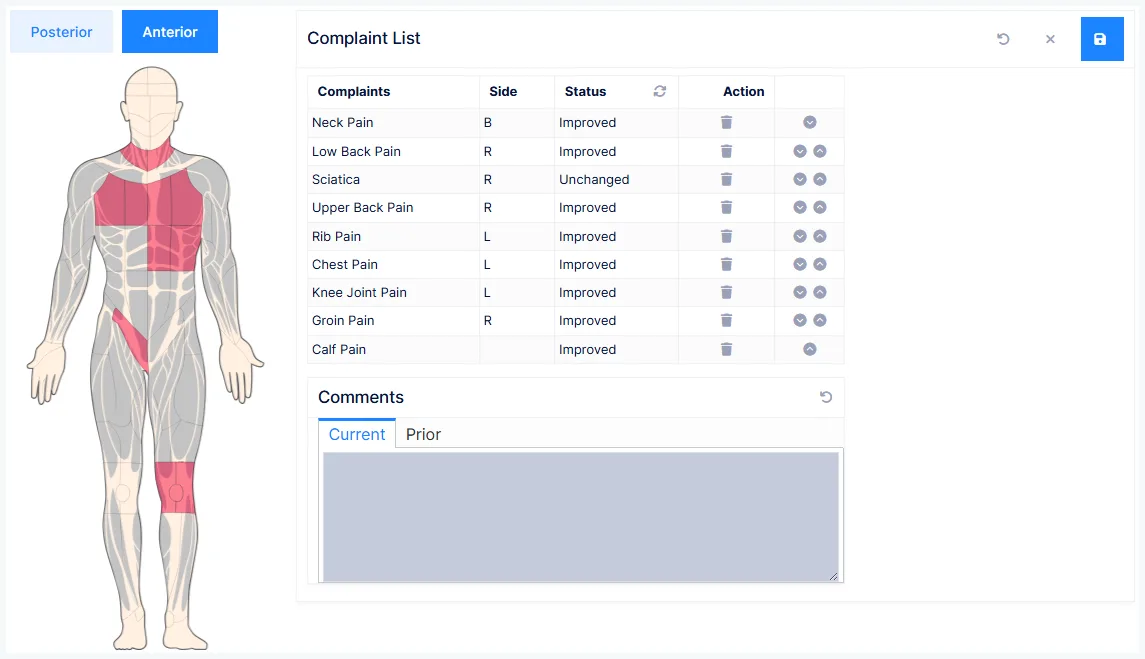
A patient can have up to 15 active complaints at once.
The complaint detail screen
Five tabs: Main, Related, Worse/Better, DDx and History.
Main
| Field | Notes |
|---|---|
| Side | Left · BML · Bilateral · BMR · Right |
| Severity | Mild · Mild to Moderate · Moderate · Moderately Severe · Severe |
| Frequency | Constant · Occasional · Intermittent · Frequent |
| Status | How the complaint is doing since last visit — see below |
| Movement | Inflexibility · Restricted Movement · Stiffness |
| Pain Quality | Multi-select — achy, burning, sharp, throbbing and so on |
| Sensation | Multi-select — numbness, tingling, pins and needles, weakness… |
| Pain Scale | 0–10, per complaint |
| % Improved | Second visit onwards |
Laterality is legally required
Identifying the side — left, bilateral or right — is mandated by state boards and federal agencies. It is not optional detail.
Tick everything the patient actually says
Pain Quality and Sensation are multi-select on purpose. A patient who describes their pain as "burning and sharp, with pins and needles" should have all three recorded — that is the description regulators expect, and it is what makes the note specific to this visit.
Status — and the ¶ mark
Status records how the complaint has changed: New Problem, Improved, Unchanged, Worse, Exacerbation, Recurrence, Recovered, and finer grades like Slightly Improved or Much Worse.
The ¶ mark changes how much reaches the note
Some statuses are marked with a ¶. That mark is the difference between one sentence and several paragraphs.
- A status without ¶ generates a single summary sentence
- A status with ¶ generates everything you entered across all the tabs
Which means: detail entered on the Related, Worse/Better and History tabs only reaches the note when the status carries a ¶. Record a full history under a non-¶ status and it is silently left out.
No SmarText is the exception — it generates nothing at all, and is how you switch a complaint off.
Don't delete complaints — set them to No SmarText
When a complaint resolves, setting it to No SmarText keeps it in the record while stopping it appearing in notes. That keeps the file accurate, makes a recurrence easy to pick up again, and avoids destroying history you may need later.
Related
For findings that extend the main complaint rather than being separate ones.
Choose how it relates — generalized in, localized in, migrating to, radiating to, down to, shooting into — then click the body areas involved.
A Specific toggle controls the wording: on gives precise anatomy ("right posterior deltoid"), off gives the general area ("shoulder").
Related is not a second complaint
Neck pain that spreads into the shoulder is one complaint with a related finding — not neck pain plus shoulder pain. Recording it as two complaints overstates the presentation and muddies the picture.
Worse/Better
Two lists tailored to the complaint — what aggravates it and what improves it. For a headache, aggravators include bright lights, coughing and loud noises; improvers include rest, heat, and specific medications.
DDx
A differential-diagnosis prompt for the selected complaint: for a headache, ask about vertigo, visual disturbance, memory loss, confusion, auditory dysfunction, strokes, TIA.
A prompt, not documentation
It's there to catch the thing you'd have thought of on a less busy day. Anything it prompts you to investigate should be recorded properly in the note — the prompt itself isn't the record.
History
Complaint history is a Medicare requirement
If it isn't recorded and doesn't appear in the note, a Medicare audit can reject the claims relating to that complaint.
| Field | Records |
|---|---|
| Date | When this episode began |
| Caused By | What triggered it |
| Activity at Injury | What the patient was doing at the time |
| Had in Past | How long since the first-ever occurrence |
| First Date / Recent Date | The first occurrence, and the one before this episode |
| Frequency | How often it flares |
| Additional Information | Anything else relevant |
Dates can be marked Not Known, with an approximation such as a few months ago — better than leaving them blank.
Patient comments
Free text for what the patient said, in their words. Previous visits' comments are kept and viewable under Prior.
Comment edits are permanently visible
Every change is recorded in the audit log and shown in the comment history. Auditors can see what was changed and when — so correct by addendum and explanation, never by quiet rewriting.
Updating on later visits
Complaints persist between visits: reopen each one and update its status.
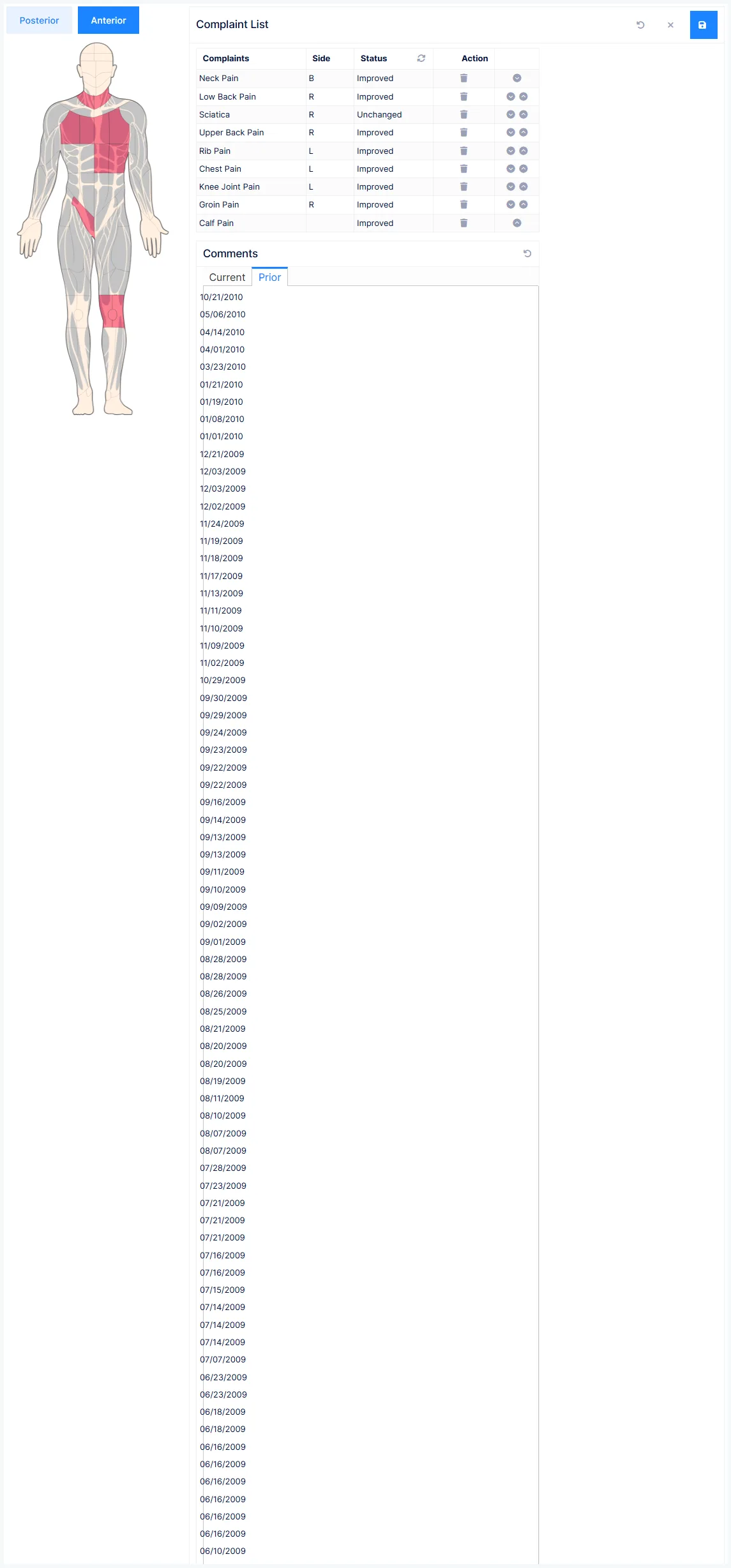
Speed Status Update sets every complaint at once — clicking cycles all of them through Improved, Worsened, Unchanged.
Bulk-set first, then fix the exceptions
It's fastest when most complaints moved the same way. The risk is leaving it there — go back and correct the one or two that didn't, or the note says something you didn't mean.